

CAD/BIM Tips & Tricks
OpenRoads vs Civil 3D: Which One Wins for Highway Design?
7 July 2026
If you’ve ever sat in a conference room while two civil engineers argue about their preferred design platform, you already know: the OpenRoads™ vs Civil 3D® debate has roughly the same energy as a Marvel vs DC conversation, except the stakes involve billions of dollars in infrastructure.
Civil 3D is especially fast and flexible for small to medium highway projects.
Both Bentley® OpenRoads Designer and Autodesk® Civil 3D are serious, feature-rich tools that have earned their place in the highway design arena. But they’re not interchangeable and choosing the wrong one for your project can cost you time, budget and more than a few late nights.
This article breaks down how each platform performs across the key areas that matter most for highway design: corridor modeling, BIM integration, drainage, collaboration, learning curve and overall value. By the end, you’ll have a clearer picture of which tool belongs in your workflow and why.
A Quick Introduction to Each Platform
Autodesk Civil 3D has been the dominant name in civil engineering software for the better part of two decades. Built on top of AutoCAD, it offers a familiar environment for engineers who grew up drafting in the Autodesk ecosystem.
Civil 3D is especially strong at corridor modeling, grading, pipe networks and land development, and its deep integration with InfraWorks™ and Revit® keeps it firmly at the center of the Autodesk BIM universe.
In OpenRoads, when you change one element, the entire corridor updates automatically to maintain design intent.
Bentley OpenRoads Designer, on the other hand, is Bentley Systems’ flagship platform for transportation infrastructure. It consolidates capabilities that used to live in separate products like GEOPAK® and InRoads® into a single comprehensive environment.
OpenRoads is built on MicroStation, which means it carries a different design philosophy: Geometry, templates and design rules are tightly interconnected, pushing engineers toward a more structured, rule-driven workflow from the start.
Both platforms are used by state Departments of Transportation (DOTs), major consulting firms and federal agencies worldwide. Neither is a niche product. The question is one of fit, not prestige.
Corridor Modeling: Where the Real Work Happens
For highway design, corridor modeling is the heart of everything. This is where the two platforms diverge most noticeably in philosophy and practical performance.
Civil 3D corridors are built around assemblies and subassemblies, which are modular components that define the cross-sectional shape of a road.
Engineers can create highly customized assemblies for everything from standard lane widths to complex superelevation transitions and retaining walls. This modularity makes Civil 3D especially fast and flexible for small to medium highway projects, where a designer needs to iterate quickly and isn’t locked into a rigid rule set.
OpenRoads takes a different approach. Its corridor modeling is rule-based and parametric from the ground up. Templates, geometry and design standards are bound together so that when you change one element, the entire corridor updates automatically to maintain design intent.
State DOTs, federal agencies and project owners increasingly expect a connected digital model that supports construction management, asset tracking and long-term operations.
This isn’t just a convenience feature. On a 50-mile highway corridor with dozens of interchanges, that kind of automatic propagation can save weeks of manual rework. According to user reviews and professional comparisons, OpenRoads consistently outperforms Civil 3D when it comes to managing complex, long-distance corridor models with fewer stability issues at scale.
The practical takeaway: If yours is a county road-widening project or a medium-complexity interchange, Civil 3D’s flexibility is a genuine advantage. If you’re designing a 100-mile interstate expansion, OpenRoads’ structured approach tends to win on consistency and stability.
BIM Integration and Digital Delivery
Highway design is no longer just about producing a set of drawings. State DOTs, federal agencies and project owners increasingly expect a connected digital model that supports construction management, asset tracking and long-term operations. Both platforms have invested heavily here, but they approach it from different directions.
Civil 3D’s BIM story is built around the Autodesk ecosystem. Its integration with InfraWorks allows engineers to pull conceptual designs and context data into detailed design, while connections to Revit and Navisworks® support multi-discipline coordination and clash detection.
Civil 3D wins on accessibility and ecosystem breadth. OpenRoads wins on enterprise data management depth and vendor support quality.
The 2025 release added tighter sight-distance analysis, AASHTO (American Association of State Highway and Transportation) 9th-edition truck templates and improved roundabout design rules, keeping the product competitive for transportation-specific applications. The Autodesk ecosystem is broad, which is both its strength and its occasional weakness. More connections mean more interoperability to manage.
OpenRoads’ BIM integration runs through Bentley’s iTwin® platform. As of 2025, Bentley’s iTwin Services sync OpenRoads models to cloud-based digital twins, allowing engineers to push design updates directly to operations and maintenance dashboards in near real time.
Reality meshes from drone scans can sit in the same file as detailed engineering geometry, enabling clash checks in real-world context rather than abstracted model space. OpenRoads also supports IFC (Industry Foundation Classes) 4, LandXML and native DGN file formats, giving it strong interoperability across disciplines and international standards.
For asset owners who want to manage a highway network beyond project delivery, OpenRoads and the iTwin ecosystem offer a more mature and direct path to digital twin operations. For firms already embedded in the Autodesk world, Civil 3D’s BIM loop is more than sufficient and arguably easier to maintain.
Drainage Design and Hydraulic Analysis
No highway project is complete without addressing what happens when it rains or the snow finally melts. Both platforms include drainage design tools, but their depth and integration differ.
Civil 3D handles pipe networks and basic stormwater layout well. For more advanced hydrology and hydraulics, most Civil 3D workflows require exporting to dedicated tools like Autodesk SSA (Storm and Sanitary Analysis) or third-party software. This is a functional approach, but it does introduce additional file transfers and potential data loss between platforms.
OpenRoads Designer includes built-in drainage analytics that reduce those round trips to separate hydrology applications. Engineers can perform stormwater design and analysis within the same environment as their roadway geometry, which keeps design intent linked to drainage outcomes without an export step. For highway projects where drainage is not a minor afterthought but a significant design driver, that integration is genuinely useful.

Drainage is critical and both platforms handle it well.
Collaboration and Data Management
Large highway projects involve surveyors, geotechnical engineers, bridge designers, utility coordinators and environmental consultants, all working on the same project at different times. How well a platform handles that complexity matters enormously.
Civil 3D has made meaningful strides in cloud collaboration through Autodesk Docs and the broader Autodesk Construction Cloud platform. Teams can manage drawings, data and markups in a connected environment, and Civil 3D’s widespread adoption means that most firms that a DOT contracts with already know the software.

Of course, both platforms offer collaboration tools. It’s 2026, not the dark ages.
That talent availability isn’t a trivial consideration. On the software review platform, G2, reviewers note that Civil 3D is easier to use than OpenRoads, which translates directly into lower onboarding costs and a larger available labor pool.
OpenRoads uses Bentley’s ProjectWise® for enterprise-level collaboration and data management. ProjectWise is a hearty document and data management system with a long track record in major infrastructure programs. OpenRoads Navigator extends this collaboration to the field, allowing project teams to review 3D designs and track status on-site.
Reviewers on G2 note that OpenRoads is easier to administer at the organizational level and scores higher for quality of ongoing product support, suggesting that once a team is set up and trained, the platform is well-managed from the vendor side.
My overall assessment? Civil 3D wins on accessibility and ecosystem breadth. OpenRoads wins on enterprise data management depth and vendor support quality.
Learning Curve and Talent Availability
This is the part where Civil 3D has a structural advantage that’s hard to overstate. Because Civil 3D runs on AutoCAD, anyone who has spent time in an Autodesk environment can adapt to Civil 3D relatively quickly.
The reality is that highway design isn’t one-size-fits-all and neither are the tools that support it.
The interface is familiar, the file formats are familiar and the training resources are abundant. Universities, community colleges and online platforms are full of Civil 3D coursework. When you need to staff up for a project, finding qualified Civil 3D users is dramatically easier than finding experienced OpenRoads designers.
OpenRoads Designer has a steeper initial learning curve, particularly for engineers coming from an AutoCAD background rather than MicroStation. The rule-based, parametric approach is powerful once adopted, but it requires engineers to think differently about how they build a model.
Bentley has invested in improving the user experience and reviews note ongoing improvement, but the talent pool remains considerably smaller than Civil 3D’s.
For firms that handle occasional highway projects alongside other civil work, the Civil 3D learning curve is likely already paid for. For firms that specialize in large transportation infrastructure and are willing to invest in training, OpenRoads pays back that investment through efficiency on complex, large-scale work.
Pricing and Licensing
Cost is rarely the deciding factor on major infrastructure software, but it’s worth understanding the differences.
Civil 3D is available through Autodesk’s subscription model, starting at approximately $275 per month for a single user, with discounts for multi-year and multi-seat arrangements. The broader Autodesk Infrastructure Design Suite, which bundles Civil 3D with InfraWorks and other tools, is available at higher tiers.
What looks good in a demo often feels very different when you’re actually modeling a complex interchange at 10 p.m. before a submittal deadline.
OpenRoads Designer pricing starts at around $6,057 per user per year and includes access to training resources, consulting services and Bentley’s expert network. That higher entry price includes services that would be additional costs in the Autodesk model, so the total cost of ownership comparison is more complex than the list price suggests.
Both platforms offer free trials, which are genuinely worth taking advantage of before committing. What looks good in a demo often feels very different when you’re actually modeling a complex interchange at 10 p.m. before a submittal deadline.
So, Which One Actually Wins?
In my opinion, it all depends on what you need. There’s no universal winner, which may be the least satisfying conclusion (apologies) but the most honest one. What the comparison does unequivocally reveal, however, is that each platform is genuinely better suited to a specific context.
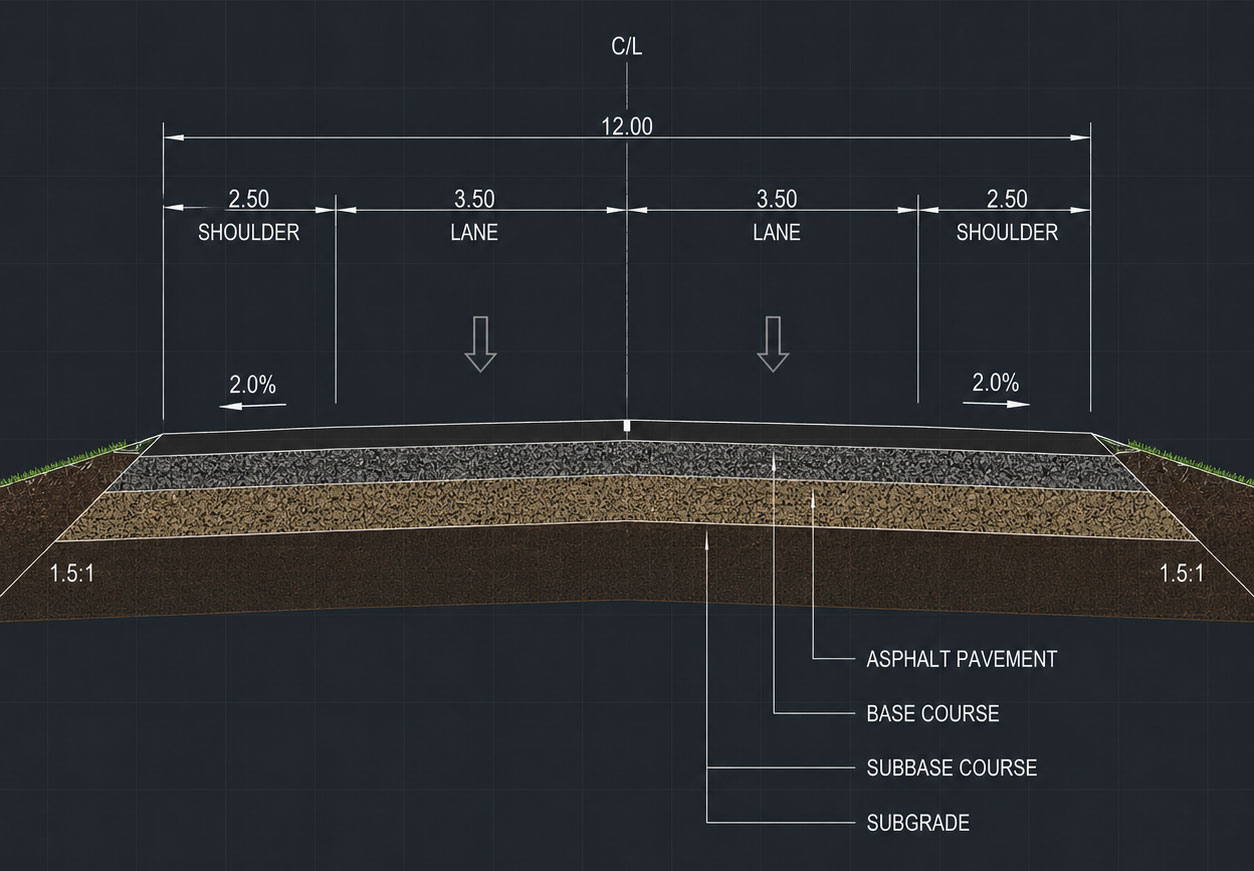
We drive on roads every day, but how often do we consider what lies beneath the surface under our wheels?
Choose Civil 3D if:
- your firm handles a variety of civil engineering work beyond just highways.
- your team is already in the Autodesk ecosystem.
- you need access to a large talent pool.
- your highway projects are small to medium in scale with a need for quick iteration and flexibility.
Choose OpenRoads Designer if:
- your work is concentrated on large-scale transportation infrastructure.
- you need enterprise-grade data management and long-term digital twin integration.
- project complexity demands rule-based consistency across long corridors.
- your organization is willing to invest in training for long-term efficiency benefits.
Many large DOTs and major consulting firms maintain competency in both, assigning projects to the platform that best fits their scope and stakeholder requirements. I’m not trying to hedge my bets here, but the reality is that highway design isn’t one-size-fits-all and neither are the tools that support it.
What both platforms share is a genuine commitment to advancing how infrastructure gets designed, delivered and managed. The infrastructure investment boom driven by programs like the U.S. Bipartisan Infrastructure Law, which allocated $85 million just for Advanced Digital Construction Management Systems grants, is pushing the industry toward more sophisticated digital workflows. Both Civil 3D and OpenRoads are evolving rapidly to meet that demand.
The Final Word
If your team is standing at the crossroads, consider not just what each platform can do in isolation, but what it can do in the context of your specific projects, your existing software stack and your team’s capacity for training.
The best highway design software is the one your engineers can use effectively to meet the deadline. Both Civil 3D and OpenRoads clear that bar. The real question, therefore, becomes which one clears it for your projects?

Ultimately, the decision will largely be determined by your project. Either way, it’s a good choice.
If you want turbocharged tools for MicroStation (including OpenRoads) or AutoCAD (including Civil 3D), call us at 727-442-7774 and let’s talk about what makes sense for your next project. Alternatively, chat with us online at AxiomInt.com.

Axiom's President
Oscar Albornoz
Feel free to share this article on your social media:
